PhantomBuster gets a bad reputation because a lot of people use it badly. They set it and forget it, run aggressive automations, blow up their LinkedIn account, get banned, and then complain that the tool doesn't work.
The tool works. The problem is the operator.
PhantomBuster is a browser automation framework. It's incredibly powerful. You can automate almost anything a human would do on LinkedIn: scraping profiles, sending connection requests, sending messages, tracking profile visitors, exporting data. But that power comes with responsibility.
LinkedIn's terms of service explicitly forbid automated scraping and bulk connection requests. If you get caught, they ban you. Permanent. IP-level bans. You can't just create a new account.
So the question isn't "does PhantomBuster work?" It's "how do you use PhantomBuster without getting caught and without violating terms of service?"
That's what this playbook covers.
The Phantoms That Actually Work in 2026
1. LinkedIn Profile Scraper
This is the core automation. Point it at a LinkedIn search (e.g., "people in tech in San Francisco"), and it extracts profile data: name, title, company, location, headline, URL, previous roles. It's clean, fast, and effective when used responsibly.
The key: don't scrape 10,000 profiles at once. Scrape 50 at a time. Spread it across the day. LinkedIn has rate limits. If you hit them too hard, you get temporarily blocked. If you're persistent, you get permanently banned.
2. LinkedIn Sales Navigator Search
This phantom automates LinkedIn Sales Navigator. You can set search filters (company, title, industry, seniority, job change, etc.) and PhantomBuster will run the search, extract results, and export them. This is less aggressive than raw scraping because you're using LinkedIn's own search tool - LinkedIn is technically allowing it - but it's still automation.
The upside: Sales Navigator is more refined data. The downside: you're paying for Sales Navigator ($900-2,400/year) plus PhantomBuster credits.
3. LinkedIn Auto Connect
Send connection requests automatically. This is useful for list building, but it's also where most people get banned. The rule: send 5-10 connections per day from a single account. Not 100. Not 50. 5-10.
Why? LinkedIn monitors abnormal behavior. If your account is six months old and you suddenly send 100 connection requests in a day, that's a red flag. LinkedIn's algorithms detect this. You get rate-limited, then banned.
The smart move: warm your profile first. Like, comment, share on LinkedIn for a few weeks. Establish normal activity. Then run auto-connect at conservative rates. And use multiple accounts if you need volume (more on this below).
4. LinkedIn Auto Message
Send automated messages to your connections. This is powerful for nurture, onboarding, and outreach. But the same warnings apply: conservative volume, normal-looking behavior, quality over quantity.
The best use case: you just connected with someone. PhantomBuster automatically sends them a message after 24 hours saying "Hi [Name], wanted to reach out because [specific reason]. Let's grab coffee." It's not spam because there's context (the connection is fresh) and personalization (even if it's templated).
5. LinkedIn Profile Visitors Tracker
See who's visiting your profile. Not technically a prospecting automation, but incredibly useful for outreach. When someone visits your profile and they're in your target market, that's intent. Message them within 24 hours: "Hey [Name], I noticed you visited my profile. Thought I'd reach out - we're helping [similar companies] with [outcome]."
This has a 15-20% response rate because there's real intent (they visited you first).
The Phantoms to Avoid (Or Use Extremely Carefully)
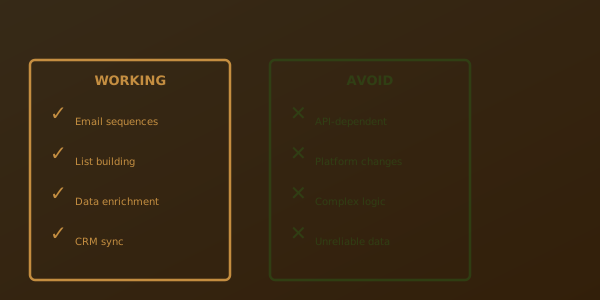
Aggressive Bulk Connection Requests
Scraping 5,000 LinkedIn profiles and auto-connecting to all of them. That's banned-account territory. LinkedIn will catch this in 48 hours. Don't do it.
Automated Messaging Without Personalization
Using PhantomBuster to send the exact same message to 1,000 people. Even if it's automated, it needs to feel personal. At minimum, include their name and one detail about their company or role.
Fake Profiles for Engagement Farming
Creating 100 dummy accounts, warming them up, then using them to bulk scrape and connect. LinkedIn has gotten sophisticated at detecting this. The moment you link them - even through your IP address or shared proxies - they get flagged and banned together.
Scraping Without Respecting Rate Limits
PhantomBuster has built-in delays and rate limiting. Don't override them. If it's set to scrape profiles with a 5-second delay between each one, don't change it to 1 second. The delays exist for a reason - to mimic human behavior.
Using Scraped Data to Spam
Scraping email addresses from LinkedIn profiles and immediately cold emailing them. That violates the Computer Fraud and Abuse Act (in the US) and GDPR (in Europe). Don't do it.
If you're going to use scraped data, use it as a sourcing tool. Verify the data. Add context. Send personalized outreach. Treat it like any other lead list.
The Architecture: Multi-Account Strategy with Profile Warming
The operators who don't get banned use accounts strategically.
The Setup
You have a primary account (your real identity, public-facing). You have 2-3 secondary accounts (different names, different photos, different industry verticals). You never link them. You never log in from the same device at the same time. You treat each account as a completely separate LinkedIn user.
The primary account is for relationship building and content. It doesn't do aggressive automation. It's your real presence on the platform.
The secondary accounts are for prospecting. They do the heavy lifting: bulk scraping, connection requests, messaging sequences. If one of them gets temporarily rate-limited or flagged, it doesn't blow up your main account.
Profile Warming
Before you run any aggressive automation on a secondary account, warm it for 3-4 weeks:
- Post 1-2 articles per week (or share content). Nothing spammy - just genuine industry insights.
- Comment on 10-15 posts per week. Thoughtful comments, not just "Great post!" stuff that adds no value.
- Connect with 20-30 people per week. Mix of people you actually know, relevant industry folks, and random warm outreach.
- Send DMs to a few people per week. Real conversations, not templates.
After 3-4 weeks, the account looks normal. LinkedIn's algorithms see regular activity. Now you can run PhantomBuster automations at conservative rates without triggering blocks.
Volume Strategy
Per account, per day:
- Connections: 5-10
- Profile scrapes: 50-100
- Messages: 5-10
If you need 100+ connections per week, use 2 accounts. If you need 200+, use 3. This spreads the volume and reduces the risk of any single account getting flagged.
The Workflow: Scraping → Enrichment → Outreach → Follow-up
Here's how I actually run PhantomBuster prospecting:
Step 1: Scraping (PhantomBuster + Secondary Accounts)
Define your target (e.g., "VPs of Sales at Series A/B SaaS in tech"). Use LinkedIn Profile Scraper phantom to extract 50 profiles. Schedule it to run during off-peak hours (midnight UTC, for example) so it's not concurrent with your other activities and doesn't trigger rate limiting.
Export the data: name, title, company, location, LinkedIn URL.
Step 2: Enrichment (Clay + Google Search)
You have names and companies. Feed this into Clay. Clay will append: email addresses (if available), company information, industry, funding stage, headcount changes. You now have context beyond what's on LinkedIn.
Next, run each person through a quick Google search (or use Claude to summarize publicly available information). You're looking for news, articles, or information that creates a personalization hook.
Output: name, title, company, email, LinkedIn URL, enrichment data, personalization hook.
Step 3: Segmentation
Not all scraped leads are equal. Segment by intent:
- Hot: Just changed jobs, company raised funding, recent news. Outreach immediately with highest personalization.
- Warm: Fits ICP perfectly, no recent signal. Outreach with moderate personalization.
- Cold: Fits ICP loosely or has no signal. Save for broader nurture or skip.
Step 4: Outreach (PhantomBuster LinkedIn Message or External Email)
Here you have a choice:
Option A: PhantomBuster LinkedIn Auto Message
Send via LinkedIn directly from a secondary account. Template: "Hi [Name], I came across your profile and your work at [Company] caught my attention, especially around [specific detail]. We're helping [similar companies] with [outcome]. Thought it might be worth a quick conversation. Free?"
This is lower friction - people check LinkedIn messages - but it's also visible to LinkedIn's algorithms (which limits volume).
Option B: Email from Your Domain
Use the email addresses from Clay enrichment. Send from a proper email provider (not LinkedIn). Subject line and copy should be personalized and professional. Compliance: include unsubscribe link, company name, physical address.
This is higher volume and less likely to trigger blocks, but it requires email deliverability setup (SPF, DKIM, domain warming).
Most operators use Option A for tier-1 prospects (hot/warm) and Option B for tier-2 (warm/cold).
Step 5: Follow-up (PhantomBuster LinkedIn Auto Message or Email Sequence)
Set up a follow-up phantom that sends a second message 5 days after the first (if no reply). Different message, different angle: "Hey [Name], wanted to follow up on my last note. No pressure, just thought this might be worth a conversation given what I know about your business."
Most responses come from follow-ups, not initial outreach. Don't skip this step.
Compliance and Risk Mitigation
LinkedIn Terms of Service
LinkedIn explicitly forbids automation. It's in their TOS. You're technically violating it every time you use PhantomBuster. The risk is account ban.
The mitigation: use accounts you don't care about getting banned (secondary accounts), operate at conservative volumes, and accept that you might lose an account. It's a cost of doing business.
GDPR
If you're scraping profiles of EU residents or sending them outreach, you need their consent. In practice, this is impossible to verify from LinkedIn profiles. The safest approach: don't target EU-based prospects from EU-registered companies. Target US-based prospects only, or be very selective.
When you do send outreach, include an unsubscribe mechanism and respect opt-outs immediately.
CAN-SPAM (US)
If you're cold emailing (not messaging on LinkedIn), you need an unsubscribe link, company name, and physical address. PhantomBuster messaging doesn't require this (LinkedIn's TOS is different), but email outreach does.
LinkedIn Profile Rights
You're extracting publicly available data from LinkedIn. The data itself is public (anyone can see those profiles). But scraping and bulk exporting violates LinkedIn's TOS. They don't care that the data is public - they care that you're automating access.
The risk: account ban. The legal risk in the US is lower (case law is thin). The GDPR risk in Europe is moderate (depends on how you use the data).
Phantom Chaining: Multi-Step Automation Workflows
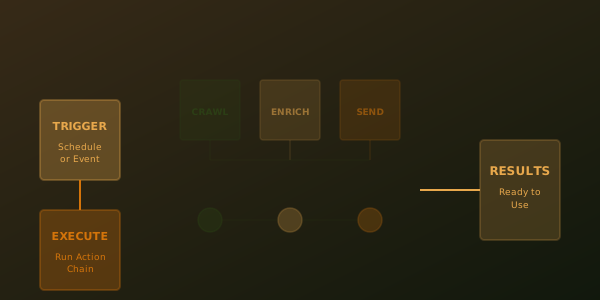
This is where PhantomBuster gets powerful. You chain phantoms together to create workflows.
Example Workflow: LinkedIn Search → Scrape → Message → Follow Up
- Phantom 1: Run a LinkedIn Sales Navigator search for "VP of Sales at Series A SaaS in tech." Export results.
- Phantom 2: Take those results, scrape their full profiles (adding email addresses if available).
- Phantom 3: Auto-message them with a personalized first touch.
- Phantom 4 (5 days later): Auto-message them with a follow-up if no reply.
This entire workflow runs on a schedule with no human intervention. You set it up once, it repeats weekly or monthly. You review results weekly, update targeting based on data, iterate.
Example Workflow: Visitor Tracking → Scrape → Message
- Phantom 1: Check who's visited your profile in the last 24 hours. Export names.
- Phantom 2: Scrape their full profiles to get contact info and company details.
- Phantom 3: Auto-message them: "Hey [Name], I noticed you visited my profile. Would love to connect - what brought you by?"
This has a much higher response rate (15-20%) because there's actual intent. They visited you.
What to Monitor and Adjust
Account Health Metrics
- Connection acceptance rate (should be 50%+)
- Message read rate (should be 40%+)
- Reply rate (should be 5-10%)
- Connection request blocks or delays (sign of rate limiting)
- Messages that get marked as spam (should be <1%)
If acceptance rate drops below 30%, you're sending to the wrong people or being too aggressive. If you start seeing "add friend" errors or delays, LinkedIn is rate-limiting you - slow down.
Data Quality
Check a sample of scraped emails. Are they accurate? Are they outdated? Bad email data kills your domain reputation. If email bounce rates are >5%, stop using that data and improve your enrichment process.
Outreach Performance
Track: opens, clicks, replies, meetings. Which messaging angles work? Which target personas respond best? Which industries are responsive? Update your phantoms based on what's working.
The Bottom Line
PhantomBuster is powerful. Used responsibly, it generates real pipeline. Used recklessly, it gets you banned.
The operators I know who've been successful with PhantomBuster do three things:
- They use multiple accounts and spread volume across them.
- They warm accounts before running aggressive automation.
- They respect rate limits, use conservative volumes, and iterate based on data rather than chasing vanity metrics.
If you follow those three rules, PhantomBuster will work for you. It won't be your entire prospecting engine - you'll use it in combination with Clay, Apollo, and email - but it will generate qualified leads at a fraction of the cost of hiring an SDR.
Just remember: PhantomBuster works because it's powerful. That power comes with risk. Respect the platform. Respect your accounts. And always have a backup plan if one gets banned.