Apollo.io is the most versatile prospecting tool on the market right now. It's not perfect. But if you're running B2B outreach at any scale and you're not using Apollo, you're leaving money on the table.
The problem is most teams treat it like a glorified email tool. They build a list, write a template, hit send. That's not prospecting. That's spam at scale.
When you use Apollo correctly - with signals, segmentation, and continuous testing - conversion rates run 2-3x higher than the baseline. I've seen teams go from 3% reply rates to 8-10% just by changing how they approach list building and sequencing.
Here's what's actually working in 2026.
List Building Strategy: Start with Intent, Not Just Demographics
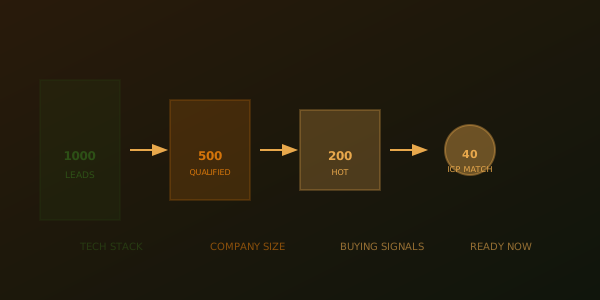
The first mistake: building lists based purely on company size and title.
"Give me all VPs of Sales at tech companies with 50-500 people in the US." That's a demographic filter. It gets you 50,000 names that have exactly zero intention to talk to you right now.
Apollo's real power is intent signaling. Here's what actually drives response:
Job Change Signals
Someone just became a VP. They're 90 days in. They have a mandate to show progress. They're resource-constrained. They're looking for solutions. This is the highest-intent prospect on Earth, and most teams don't prioritize them.
Apollo has a job change signal in the Smart List feature. Use it. Set a filter for "VP of Sales" with "job changed in the last 60 days." That's a list you can actually convert.
Funding Signals
Company just raised Series B. They're hiring. They're opening new markets. They're building infrastructure they didn't have before. Their budget just increased. If you sell to sales ops, RevOps, or any infrastructure play, funding is a signal.
Apollo pulls funding data from Crunchbase. Set a filter: "raised Series B or C in the last 6 months." Combine it with company size and industry. Now you have a list that's both qualified and actively ready to buy.
Technology Change Signals
They just installed Salesforce. That means they're building out their stack. They just added Marketo. That means they're scaling demand gen. Apollo integrates with technology install data from Apollo's own database and third-party providers like G2 and SimilarWeb.
If you sell a tool that complements or replaces something they just bought, technology change is signal gold.
Growth/Hiring Signals
They just added 50 new employees in a month. That usually means new department, new mandate, new budget. Apollo tracks headcount changes month-over-month. Use it.
The better your signals, the smaller your list, but the higher your conversion. You'll go from 50,000 names and 0.5% reply rate to 2,000 names and 8% reply rate. That's ROI.
List Building Workflow: The Setup That Actually Works
Here's how I structure a prospecting list in Apollo:
Step 1: Define ICP in Apollo
Don't skip this. Write it down in Apollo's Smart List: company size, revenue range (if available), industry, geography. Be specific. "Tech" is too broad. "B2B SaaS in HR Tech, Series A-C funded, $5M-$50M revenue" is the right level of specificity.
Step 2: Layer Signals
Start with one strong signal (job change OR funding), not multiple. Multiple signals are too restrictive. You're looking for the 20% of the market that's actively in-market right now.
If you're selling to sales teams and you have a choice between job change and funding, always pick job change. The person in a new role has the most pressure to deliver.
Step 3: Add Title Filters (Loosely)
Don't be too granular. "VP of Sales" AND "VP of Revenue" AND "Chief Revenue Officer" AND "Sales Director" - capture multiple titles because your buyer might have a different org structure than you expect.
A company with 100 people might have a VP of Sales. A company with 500 might have a VP of Enterprise Sales, a VP of Mid-Market, and a Director of Sales Development. Capture all of them.
Step 4: Exclude Yourself
Use Apollo's exclusion filters to remove companies you already work with or have a relationship with. Nothing kills a campaign faster than accidentally reaching out to a client or a company you pitched last month.
Step 5: Export and Run Through Enrichment
Don't send cold emails directly from the Apollo list. Export it, run it through Clay or another enrichment tool for additional context and validation, then feed it back into Apollo or your CRM. This adds 30 minutes of work but catches bad data and gives you hooks for personalization.
Your list should be: name, title, company, email, recent signal, and one personalization hook.
Sequence Design: The Multi-Touch Framework That Works
A sequence is what separates professional prospecting from spray-and-pray.
The classic mistake: one email, hit send, hope for replies. That gets you 1-2% response rate because you're only reaching people who see the email at the exact moment they're open to it.
A sequence acknowledges that most people won't respond to the first touch. That's normal. That's fine.
The 5-Touch Sequence Framework
- Touch 1 (Email): The first email. Short, specific to their company/role, one CTA. Personalizes the signal (e.g., "I saw you just became VP of Sales at [company] - want to talk about how we're helping similar-stage companies scale their sales org?"). Send this 2-3 days after they're added to the list.
- Touch 2 (Email): 3 days later. They didn't respond to the first one. This isn't another version of touch 1. This is a different angle. Maybe it's a case study. Maybe it's a question that's specific to their company. "A lot of your competitors are using [approach]. How are you handling this?"
- Touch 3 (Email): 5 days later. Another angle. Maybe it's social proof ("Three companies in your space just started working with us"). Maybe it's curiosity ("We found something in your industry that might be interesting - want to see it?").
- Touch 4 (LinkedIn): By email touch 3, if there's no response, switch channels. Find them on LinkedIn, send a connection request with a personalized note. This is not another email. It's a signal change. Different platform, different message.
- Touch 5 (Email, 2 weeks later): Final touch. Lower stakes. No ask. "We're hosting a webinar on [topic] next month. Thought you might find it valuable - link here. If you're not interested, no worries." This is a soft exit.
Space touches by 3-5 days. Most people won't respond to touch 1 or 2. By touch 4-5, you're reaching people who were interested but busy, or people who need multiple exposures to take action.
Average reply rate on this sequence: 6-10% (assuming good list and personalization). Average meeting rate: 1-2% of sent emails. That's viable at scale.
Personalization at Scale: How to Actually Do It
Apollo handles basic personalization variables: {{first_name}}, {{company_name}}, {{title}}. Use them.
But the real personalization is the hook. Every email should reference something specific to their company or role:
- "I noticed you installed Salesforce last month. A lot of teams in your industry are struggling with [specific problem] in the first 90 days. We've built a tool that handles this."
- "Your company just raised Series B. Congrats. Most companies we work with post-Series B run into [specific challenge]. Happy to share how we solved this for [similar company]."
- "You're new to the VP Sales role. Typically the first 90 days are about [specific priority for new sales leader]. We've worked with [number] new VPs in your space who tackled this successfully."
This level of specificity takes 90 seconds per email to add, but it shifts response rates from 3% to 8%.
Apollo's team messaging feature lets you add custom fields. Create a field called "personalization_angle" and populate it during your enrichment phase. Then reference it in your template. You're not spending extra time; you're just being intentional during the planning phase.
A/B Testing: What Actually Changes Response
Most teams don't A/B test. They send an email, measure response, and call it science.
Real testing requires: a hypothesis, a variable to test, enough volume to measure significance, and enough patience to not over-rotate on small samples.
What to Test
- Subject Line: Keep everything else identical, change only the subject line. Test curiosity-driven ("One thing we noticed...") vs. benefit-driven ("How to 3x sales team productivity"). Run 200+ emails per variant. Measure open rate.
- Email Length: Test 50 words vs. 150 words. Shorter almost always wins in B2B cold email, but test it with your specific audience.
- CTA: Test "reply with [X]" vs. "book a call [here]" vs. no CTA, just value ("Thought this might be useful"). Most operators find "reply if interested" outperforms hard CTAs.
- Send Time: Test Tuesday 9am vs. Thursday 2pm vs. Friday 3pm. Different industries respond at different times. Saturate people who are checking email first thing morning vs. people who batch check midday.
- Personalization Depth: Test templated with one variable ({{first_name}}) vs. specific reference to their company action. The specific reference usually wins 2-3x.
How to Structure a Test in Apollo
Apollo's A/B testing feature is in campaigns. Set up a campaign, create two variants of your email with only one variable changed, and Apollo will randomly assign people to each variant and measure results. Run it for at least 200 sends per variant to get signal.
The key: test one variable at a time. If you change the subject line AND the CTA AND the send time, you won't know which one drove the difference.
Deliverability and Compliance: The Unglamorous But Critical Piece
You can have the perfect email and perfect list, but if your domain reputation is trash, nothing lands in the inbox.
Domain Warming
If you're new to sending from a domain, warm it up. Start with 10-20 emails per day for the first week. Scale to 50-75 per day by week two. By week three, you can go to 200+ per day. Apollo has built-in domain warm-up. Use it.
Warming takes 3 weeks. Plan accordingly.
Email Authentication
Set up SPF, DKIM, and DMARC records for your sending domain. This tells email providers "yes, I authorized these emails." It's a 30-minute setup one time and it cuts bounce rates in half.
Apollo's setup wizard walks you through it. Do it.
List Hygiene
Bad emails destroy your reputation. Before you send to a list, Apollo has email verification built in. It costs credits but it's worth it. Remove hard bounces (definitely invalid emails) and soft bounces before you send.
A good email verification run will tell you that 10-15% of even a freshly built list has issues. Clean that up before you send.
GDPR and CAN-SPAM Compliance
You need an unsubscribe link in every email. GDPR requires it. CAN-SPAM requires it. Apollo adds it automatically. Use it.
You need a company name and physical address in every email. Apollo can auto-populate this from your company settings. Don't skip it.
Keep unsubscribe rates under 0.5%. If they're higher, your targeting or messaging is off.
Integration with Clay and Claude for Maximum Leverage
Apollo is powerful alone. But it's devastating in a workflow with Clay and Claude.
Workflow: Clay → Apollo
Build your list in Clay (or another tool). Export to CSV. Apollo has an import feature - upload that CSV directly into Apollo. Apollo will validate emails, append missing data, and create a campaign. You've gone from list → directly to outreach in minutes.
Workflow: Apollo → Claude for Personalization
Export the Apollo list (with fields: name, title, company, recent signal). Feed it into Claude with a personalization prompt. Claude generates unique email copy for each person based on their signal and role. Paste those into Apollo as custom fields, reference them in your template.
You're not writing emails. You're creating a system that writes them.
Workflow: Apollo → CRM (HubSpot or Salesforce)
Apollo integrates directly with HubSpot and Salesforce. Every email send, open, click, and reply syncs automatically to your CRM. You never manually log anything. The entire prospect journey lives in your CRM from the moment they hit Apollo.
This is where the system becomes real. You can measure pipeline impact. You can see which lists convert to meetings, which sequences have the best reply rates, which personalization angles work for which personas.
What Changed in 2026 vs. Prior Years
Three things shifted:
Signal-Based Prospecting Became Mandatory
Spray-and-pray email doesn't work anymore. Too much noise. Everyone's doing it. The only way to cut through is intent signals. Companies raising money, hiring, installing software - these are moves you can see and react to. Demographic prospecting (size and title alone) is dead.
Sequence Design Got More Important
One email? 1% response rate. Five touch sequence? 6-10%. The multiplier comes from persistence and channel diversity. Email alone doesn't work. Email + LinkedIn is better. Email + LinkedIn + case study is better still.
Personalization Moved from Text to Hook
{{first_name}} personalization is invisible now. Everyone does it. The personalization that moves needles is contextual: "I saw you just became VP of Sales" or "You just installed Salesforce." It takes 90 seconds more to add, but it's the difference between 3% and 8% reply rate.
Common Mistakes and How to Avoid Them
Mistake 1: Huge List, One Sequence
Building 100,000 names and running them all through the same generic sequence. That gets you a 0.5% response rate and damages your reputation. Run smaller lists (500-2,000) with highly targeted sequences. Results will be better.
Mistake 2: Ignoring Reply Management
You get replies. That's good. But if there's no process for following up on them, they die in the inbox. Apollo has built-in reply tracking. Use it. Set up a cadence to actually respond to replies (ideally within a few hours).
Mistake 3: One Angle Forever
Running the same subject line and email copy for 6 months without testing. Things that work stop working. Inboxes change. Intent changes. Test monthly. Rotate messaging every 4-6 weeks.
Mistake 4: No CRM Connection
Apollo sending emails but no integration to your CRM. That's lost intelligence. You can't measure pipeline. You can't see patterns. Connect it to HubSpot or Salesforce immediately.
The Realistic Output: What to Actually Expect
With a well-built list, targeted sequence, and solid personalization:
- Open rate: 25-35% (varies by subject line testing)
- Reply rate: 5-10% of opens (so 1.5-3% of sends)
- Meeting rate: 10-30% of replies (so 0.2-0.8% of sends)
- Cost per meeting: $50-200 depending on tool spend and list size
If you're sending 1,000 emails per month, expect 15-30 replies and 2-8 meetings, depending on execution.
That's real, sustainable pipeline generation. Not magic, just process.
Getting Started This Month
1. Pick one signal (job change or funding). Build a list of 500 people with that signal.
2. Run it through email verification.
3. Design a 5-touch sequence with different angles in each touch.
4. Send to 100 people. Measure response rate. Document what worked.
5. Iterate based on data. Test a different subject line. Test different timing. Test different CTA.
6. Once you've proven the sequence, scale to 500-1,000 per month.
That's the Apollo workflow that works. It's not complicated. It's just disciplined and data-driven.